
UTXO Mover
Move several ordinals UTXOs (inscriptions, rare sats) to a new address in a single transaction with strict FIFO 1:1.
→ Open the tool · ← All tools
What this tool does
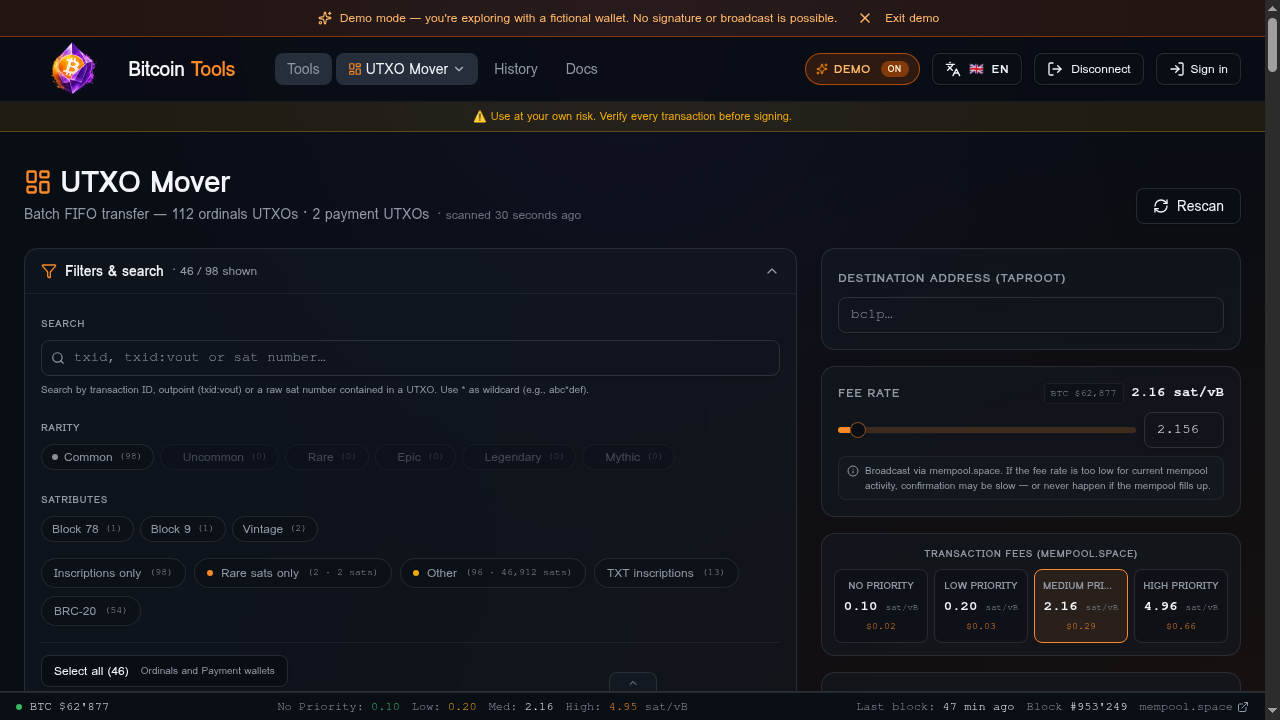
Move several ordinals UTXOs at once to a new address (new wallet, OTC sale, segregation…). FIFO 1:1 guarantees that each source UTXO yields exactly one destination UTXO in the same order — the identity of your sats is preserved.
When to use it
- Migrating to a new wallet.
- Bulk OTC sale of inscriptions.
- Cold / hot wallet separation.
- Recovering inscriptions stuck on your payment address (via the built-in Rescue mode).
Prerequisites
- Xverse wallet connected, with authorized Discord access.
- Ordiscan key configured.
- Payment UTXOs available to cover fees.
Step-by-step
- Connect your wallet: the enriched list of ordinals UTXOs appears.
- Select (drag-and-drop) the UTXOs to move. Order = output order.
- Enter the destination address (network validation runs automatically).
- Set the fee rate via the slider (mempool.space tiers refreshed every 30 s).
- Optional: advanced mode to pick payment UTXOs manually.
- Review the summary and the integrity checks.
- Click Sign → confirm in Xverse → broadcast.
Edge cases
- BRC-20 transferable locked: UTXO locked, dedicated banner. Moving it = consuming the transfer.
- Risky UTXO on payment: a payment UTXO actually contains an ordinal → auto-deselected, the risk scan flags it.
- Ordiscan quota exhausted: Retry unknown button to re-enrich only the missing UTXOs.
- UTXO already spent: background re-check against mempool.space, silently removed.
Safeguards
- Strict FIFO 1:1, rejected if integrity isn't verified.
- Network validation: rejected if the destination address doesn't match mainnet.
- Auto-deselect risky payment UTXOs.
- Dust limits enforced (330 sats P2TR).
Rare-sat tags and provenance
Each UTXO shows a single canonical classification merging what Ordiscan returned, what we compute locally from the sat numbers, and what WecSats reports. Every tag keeps its real source: a locally computed attribute is never credited to Ordiscan.
- Tags are displayed at the scope of the evidence: an exact sat when a source names one, otherwise at range or UTXO scope.
- “Confirmed” requires two independent sources on the same exact sat; “sources differ” only appears when the evidence is comparable. Incomplete coverage stays unknown.
- Filters let you narrow the list by canonical category, and an optional WecSats score is shown for individually identified sats.
- WecSats enrichment is purely additive: it changes nothing to the sat-flow, to FIFO 1:1 ordering or to the transaction that gets built.
Data sources
- Ordiscan: inscriptions, runes, sat-ranges.
- WecSats (when enabled) + local calculations: additional rare-sat categories.
- mempool.space: payment UTXOs, fee rates, broadcast.
- Sandshrew: Alkanes detection.
Server side
Ordiscan proxy + mempool.space proxy. After broadcast, the txid + tool + fee + sat-ranges are recorded in tx_history (Supabase table) for pending → confirmed tracking.